Short answerCreate a one-time forwarding rule in Gmail, Outlook or iCloud Mail that sends your 7shifts schedule emails to your private ShiftPilot address. ShiftPilot reads the shifts out of each one, and with calendar sync on they appear in Apple Calendar on your iPhone, or in Google or Outlook Calendar. Automatic import and calendar sync are Pro features.
One more app to check before you can say yes to anything
7shifts shows you your shifts. What it does not do is sit inside the calendar you actually plan your week from, next to appointments, childcare and a second job. So “are you free Thursday?” means opening two apps and comparing them in your head.
The usual fix is retyping the week into your calendar when it is published, then doing it again when it changes. If 7shifts emails you when a schedule is published, that email is all a calendar needs.
Three ways to get 7shifts onto your iPhone calendar
- Look in the 7shifts app’s settings first. If it offers a calendar option and all you want is shift times in Apple Calendar, use it. We don’t describe another company’s settings here because they change between versions.
- Add shifts by hand. Free, reliable and tedious. Nothing updates on its own.
- Forward the schedule email. One rule in your mail, set once. Besides the calendar entry you get weekly hours, overtime past 40 hours and an estimate of what the week pays.
How forwarding works: one rule, set once
ShiftPilot does not connect to your inbox or to your employer’s scheduling system. It gives you a private import address, and you tell your own mail to forward schedule emails there. From then on, a new schedule reaches ShiftPilot when it reaches you.
- Copy your import addressInstall ShiftPilot on your iPhone, sign in with Apple, and open Settings → Import. The address shown there is private to your account. Copy it.
- Find who sends your scheduleOpen a past schedule email from 7shifts and copy the address it was sent from. If you don’t get schedule emails, turn on email notifications for published schedules in your 7shifts notification settings first: ShiftPilot can only read what is emailed to you.
- Create a forwarding rule in your mailIn Gmail, Outlook or iCloud Mail, create a rule that forwards messages from that sender to your import address. The exact steps for each are below. You only do this once.
Gmail
- On a computer, open Gmail, click the gear, then See all settings → Forwarding and POP/IMAP.
- Click “Add a forwarding address”, paste your import address, then Next → Proceed.
- Gmail sends a confirmation code to that address to prove you own it. ShiftPilot shows you the code on its import setup screen; enter it in Gmail.
- Open Filters and Blocked Addresses → Create a new filter. Put your schedule’s sender in “From”, click Create filter, tick “Forward it to” and pick your import address, then Create filter.
Gmail only offers forwarding in its desktop site, not in the phone app.
Outlook
- In Outlook on the web, open Settings → Mail → Rules → Add new rule.
- Name the rule, then set the condition “From” to your schedule’s sender.
- Add the action “Forward to”, paste your import address, and Save.
iCloud Mail
- On your iPhone, open Settings, tap your name at the top, then iCloud → iCloud Mail → Mail Rules → Add Rule. On a computer: iCloud.com → Mail → the gear button → Rules → Add a Rule.
- For “If a message is from”, enter the address your schedule comes from.
- For “Then”, choose Forward to, paste your import address, and Save.
- Test it with a schedule you already haveForward your most recent 7shifts schedule email to your import address by hand and check the shifts that appear against the schedule. If they match, the rule will handle every week after it.
- Turn on calendar syncOptional. In ShiftPilot open Settings → Calendar sync to get a private, read-only calendar feed, and subscribe to it in Apple, Google or Outlook Calendar.
No rule, if you prefer. In any mail app you can forward each schedule email to your import address by hand. It does the same thing, one email at a time, and ShiftPilot never needs your email password either way.
What ShiftPilot reads from a 7shifts email
ShiftPilot recognises email from 7shifts by its sender and labels what it imports accordingly. The shifts themselves are read by ShiftPilot’s AI parser, which pulls each shift’s date, start time and position out of the email. There is not yet a hand-written reader for the 7shifts schedule layout, as there is for HotSchedules and ScheduleFly, so check the first import against your schedule.
- Schedules: each shift’s date, start time and position.
- Cover and trade requests: an email saying a coworker wants to take one of your shifts is recognised as a request, not a schedule. It appears in ShiftPilot as a shift request with a link back to 7shifts, where you accept or decline. Nothing is added to your calendar until the schedule itself changes.
What you get once your shifts are in
A calendar entry tells you when to turn up. ShiftPilot is built around the rest of what a shift means: how many hours it adds to the week and what it pays.
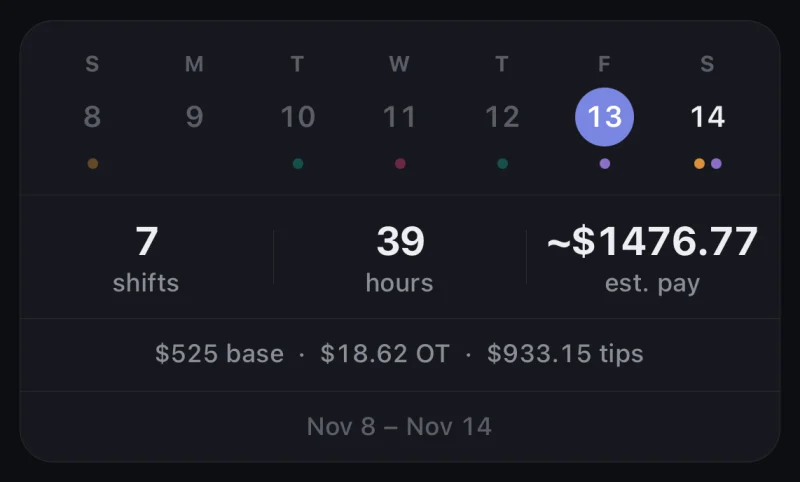
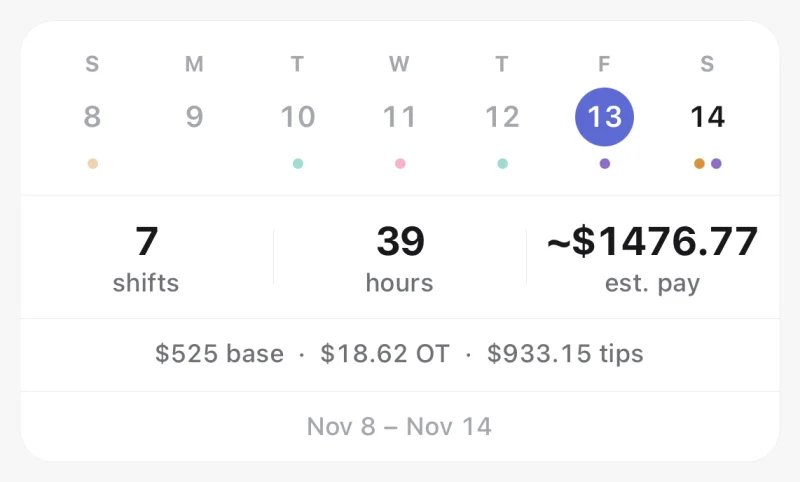
- A calendar built for shift work. Month, week and agenda views, colour-coded per job, on your iPhone.
- A reminder before every shift. The morning of, an hour before, or both.
- Hours and overtime. The week’s hours are totalled, with overtime applied weekly past 40 hours. To check a week by hand, use the overtime pay calculator.
- Estimated pay. Set a rate per job, plus night and weekend premiums and unpaid breaks, and each shift and pay period carries an estimate. The paycheck estimator shows the same sums for a single week.
- Tips and tip-out, if you earn them. Kept separate from base pay. Log a real total from a pay stub and the estimate tunes itself. See the tip-out calculator for the arithmetic.
- Apple, Google or Outlook Calendar. Pro Calendar sync is a private, read-only feed you subscribe to once.
- Apple Watch and widgets. See your next shift and clock in from your wrist; put your next shift, the week’s hours or the month on your Home Screen.
- More than one job. Each keeps its own colour, pay rate and rules, and the totals stay separate.
Honest limits
- Automatic import and calendar sync need Pro. ShiftPilot Pro is $2.99 a month or $19.99 a year in the US, with a 7-day free trial. The free plan covers your shifts and the calendar, shift reminders and pay estimates, with shifts added by hand or generated from a rotation.
- It reads email, not 7shifts itself. ShiftPilot never logs in to 7shifts. A change that is not emailed to you cannot reach your calendar, so your employer’s system stays the source of truth.
- AI-read, not hand-parsed. 7shifts schedules go through the AI parser. It usually gets them right; when it misreads a time you can tap the shift to correct it, and sending us the original email lets us improve the reader.
- End times. ShiftPilot reads the start of each shift and sets the end from the usual length you give that position. Edit the position’s length, or the shift, if yours differ.
- Calendar sync is one-way and not instant everywhere. The feed is read-only. Apple Calendar updates fastest; Google and Outlook refresh subscribed feeds every few hours.
- iPhone only. ShiftPilot runs on iPhone and iPad. There is no Android app yet, though the calendar feed can be subscribed to from any device.
- Pay figures are estimates. They are for planning and for noticing a wrong check, not a substitute for your pay stub.
Frequently asked questions
How do I get my 7shifts schedule on my iPhone calendar?
Forward your 7shifts schedule emails to your private ShiftPilot address with a one-time rule in your mail. Then open Settings → Calendar sync in ShiftPilot and subscribe to the feed in Apple Calendar. Shifts from every schedule email after that appear on your iPhone calendar without retyping.
Does ShiftPilot connect to my 7shifts account?
No. ShiftPilot never asks for your 7shifts login and does not connect to 7shifts. It reads the schedule emails your own mail forwards to it, which is why you need email notifications for published schedules turned on in 7shifts.
Is 7shifts read directly or by AI?
By AI. ShiftPilot recognises 7shifts emails by their sender, and its AI parser reads the date, start time and position of each shift. HotSchedules and ScheduleFly have dedicated readers; 7shifts does not yet, so compare your first import with your schedule.
Will a shift swap in 7shifts update my calendar?
A request to take or cover a shift shows up in ShiftPilot as a shift request, with a link back to 7shifts where you answer it. Your calendar changes when a schedule email reflecting the swap is forwarded. 7shifts remains the official record of who is working.
Can I see my 7shifts hours and pay for the week?
Yes. Once shifts are imported, ShiftPilot totals the week’s hours, applies overtime weekly past 40 hours and estimates pay from the rate you set for the job, including night and weekend premiums and unpaid breaks. If you earn tips, they are tracked separately from base pay.
Does ShiftPilot read my email inbox?
No. There is no inbox connection and no mailbox permission to grant. You set up the forwarding rule in your own mail, it sends only the schedule emails you chose, and nothing else in your inbox is ever visible to ShiftPilot.
Is ShiftPilot free?
The free plan covers your shifts, the calendar, shift reminders and pay estimates, and you can add shifts by hand or generate a rotation. Automatic import from schedule emails, schedule scanning from a photo, calendar sync and export are part of ShiftPilot Pro, which is $2.99 a month or $19.99 a year in the US, with a 7-day free trial.